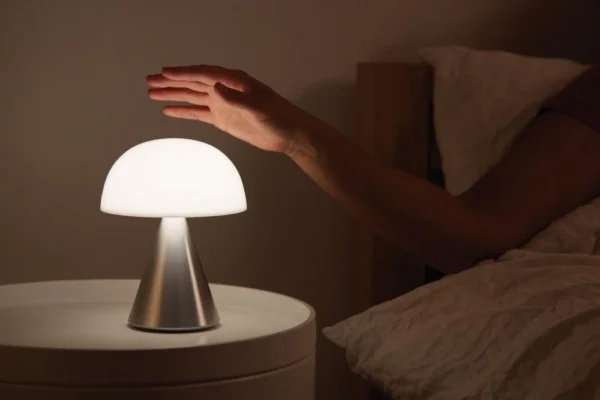
Most touch table lamps detect a change in capacitance when your finger reaches their sensing area. The electronics recognize that change and send a command to switch the light, change brightness or select a color temperature. You do not need to move a mechanical switch, but you do need to touch the area the lamp was designed to sense.
For lighting brands, the practical questions are where users should touch, what each gesture does, and whether those controls behave consistently on the finished lamp.
The sensing principle and the control sequence are separate. Two lamps can both use capacitive touch while responding differently to the same tap. When comparing models in our cordless table lamp collection, check the touch location and operating instructions alongside the lamp’s appearance.
How do touch lamps work without a mechanical switch?
A capacitive touch sensor detects a small electrical change caused by your finger. Capacitance describes how much electrical charge a system can store for a given voltage. When your finger reaches the sensing surface, it changes the capacitance measured by the sensor. The electronics detect that change.
In a common self-capacitance design, the circuit monitors a conductive sensing element, called an electrode. It compares measurements with an untouched reference. A sufficient change is interpreted as a touch; the control electronics then decide what the lamp should do.
That command reaches the circuit controlling the light’s power. On a rechargeable LED lamp, the battery supplies power while the touch sensor provides the input. Your finger is not supplying the energy that lights the LEDs. A battery-powered design can sense touch without a wired connection to earth.
This also explains why the light can stay on after you remove your hand. The controller retains the selected operating state until another command changes it.
Do touch lamps need metal, or can you touch a plastic surface?
Touch lamps need a suitable sensing arrangement, but the surface you touch does not always have to be exposed metal. An electrode can detect a finger through a suitable nonconductive covering, such as plastic or glass. Cover material, thickness and the spacing behind it affect sensitivity.
Some traditional lamps use a connected metal body as the sensing surface. Others have a dedicated pad, ring or button on the base or lamp head. A metal stem elsewhere on the lamp may have no control function at all. The presence of a metal housing does not establish that every part responds.
For example, our UFO-type cordless table lamps uses a touch control on the top. The top control adjusts brightness and color temperature, giving users a defined place to touch.

Why do short taps and long presses do different things?
The control electronics can distinguish a brief touch from a sustained one by tracking how long the input remains active. The product’s control logic assigns each recognized action a function. Depending on the design, a command may occur during a hold or after the finger is lifted.
A short tap often switches a lamp on or off, while holding may adjust brightness. However, those assignments vary. Our cone-shade dimmable metal desk lamp uses a top-mounted interface with the following controls:
| Gesture | Function on this model |
|---|---|
| Short press | Cycle through Low, Medium, High and Off |
| Long press | Switch among four color temperatures: 2700K, 4000K, 5000K and 6000K |
Here, holding changes the tone of the light rather than continuously raising or lowering brightness. Someone expecting a familiar tap-to-switch, hold-to-dim sequence could mistake that behavior for a fault.
For brands, agree on the tap-and-hold sequence before sample approval, then check that the instructions match the finished lamp. Confirm the required hold duration and any brightness memory on the actual model.
How do touch lamps dim the light?
Touch tells the lamp what brightness to select; the dimming circuit determines how that brightness is produced. These are different jobs, even when one small control board handles both.
In an integrated LED lamp, the driver may reduce LED current or use pulse-width modulation, usually shortened to PWM. PWM controls average light output by changing the proportion of time the LEDs are powered during repeated pulses. Some drivers combine dimming methods. A touch control alone does not identify which method is inside a particular lamp.
Older mains-powered touch dimmers may instead control the portion of each AC cycle delivered to a replaceable bulb. That is why bulb compatibility matters on those lamps. A replacement LED bulb must be suitable for the lamp’s dimmer; having the correct screw base is not enough.
For a rechargeable lamp with an integrated LED module, there is usually no separate household bulb to select. Check the advertised brightness levels or adjustment range and try the lowest setting in the room where you will use it. Touch operation does not, by itself, guarantee smooth dimming or the absence of visible flicker.

Can water, gloves or sensitivity settings affect touch control?
Yes. Anything that changes the signal reaching the electrode can affect touch detection, although the result depends on the design.
If wet-finger or gloved operation matters to your product, agree on the use conditions with the supplier and verify them on finished samples.
Water on the sensing area
Moisture can alter capacitance and, in some arrangements, resemble a finger touching the control. A lamp may activate unexpectedly, miss a tap or behave differently while the surface is wet. Water rejection depends on the sensor layout and control processing.
An enclosure’s water-resistance rating does not tell you whether its touch control works normally with wet fingers. Follow the model’s cleaning instructions, dry the sensing area and use dry hands for an ordinary operation check. Do not deliberately wet a lamp to test an unspecified feature.
Gloves between your finger and the control
Insulating gloves add separation between your finger and the sensor and can weaken the signal. Some capacitive designs support gloves, but ordinary touch operation does not establish that capability. If you need gloved use, ask about the intended glove material and verify it on the finished product.
Sensitivity and unwanted input
Greater sensitivity is not automatically better. Touch processing can use thresholds and filtering to distinguish a deliberate input from brief signal changes. In practical terms, one deliberate tap should register once, while brief disturbances should be ignored. Nearby switching circuits or power-supply noise can also disturb measurements. The useful outcome is consistent recognition of intended taps and holds without unwanted changes during normal handling.
What should you check if a touch lamp is not responding?
Start with the touch location, power state and operating sequence. A rechargeable lamp with an empty battery cannot respond normally, and a lamp with a separate master switch may need that switch enabled first.
Check the instructions, then try one deliberate touch on the designated area with a dry, bare finger. Give the lamp time to respond before tapping again. Repeated quick taps can advance through several modes and make a working control appear unpredictable.
If the lamp has a replaceable bulb, check the specified bulb type and dimming compatibility. If a rechargeable model behaves differently when connected to its charger, record that difference and confirm whether operation while charging is permitted. Use the specified charging equipment.
For a persistent problem, send the seller the model name, power state and a short video showing where you touch and what happens. These details are more useful than simply reporting that the sensor is broken. Internal repairs require a different assessment from these operating checks.
What should brands check before choosing a touch table lamp?
Brands should approve both the control sequence and its behavior on the finished sample. When specifying a custom LED table lamp, “touch dimming” leaves important decisions open: where to touch, which action switches off, what holding does and whether settings are remembered.
Use the intended housing, finish and power configuration when evaluating samples. Ask the manufacturer to agree on checks such as these:
| Sample check | What to confirm |
|---|---|
| Repeat deliberate taps and holds | Each gesture produces the agreed function without skipped or duplicate actions |
| Lift, reposition and carry the lamp normally | Handling does not cause unintended changes under the agreed use conditions |
| Compare multiple finished samples | Touch location and response remain consistent across the samples |
| Check battery operation and permitted charging operation | Controls behave as specified in each supported power state |
| Review instructions beside the sample | The written sequence matches the delivered product |
For example, an Amazon brand might approve a prototype with an exposed sensing pad, then add a thicker plastic cover for production. The covering changes the signal reaching the sensor. Repeat the tap-and-hold checks on the final assembly before approval, even if the early prototype responded correctly.
Agree on test conditions and acceptance criteria before production approval. If glove use, wet-finger operation or a specific memory function matters, include it explicitly in the requirements.
At iLEDGlow, we welcome inquiries from brands developing rechargeable table lamps. Send us your touch-control requirements with a reference design, preferred control location, tap-and-hold sequence, intended use conditions and estimated order quantity. These details give us a concrete starting point to discuss the model and customization scope for your project.